RescuteKit

Prepared, even offline.

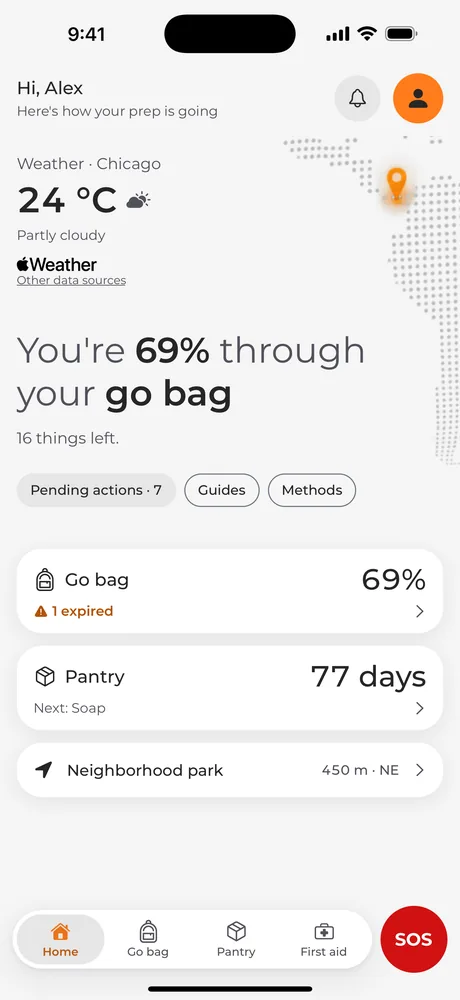
RescuteKit helps your family get ready for an emergency: build your go bag, keep track of what expires, and keep guides, first aid and SOS close at hand. Everything works without internet.

* The app isn’t published yet. These buttons will go live on launch day.

Features

Go bag and expiry dates

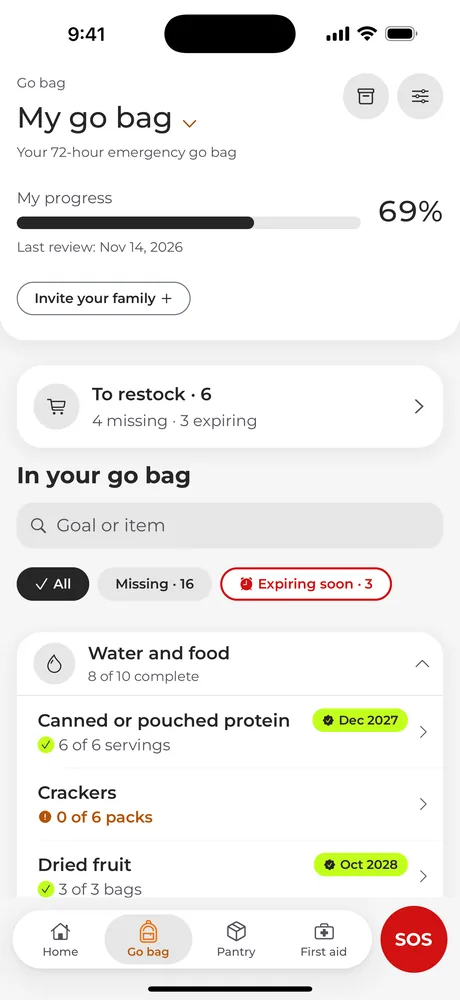
Go bag: your 72-hour emergency kit

A starter emergency kit checklist by category, with targets set per person. See what you have, what’s missing and what’s about to expire.

  • Water, food, first aid kit, tools, clothing, hygiene and documents.
  • Alerts before something expires, plus a "To restock" list.
  • A monthly reminder to check your bag.
Go bag in the app: your 72-hour emergency kit, ready offline

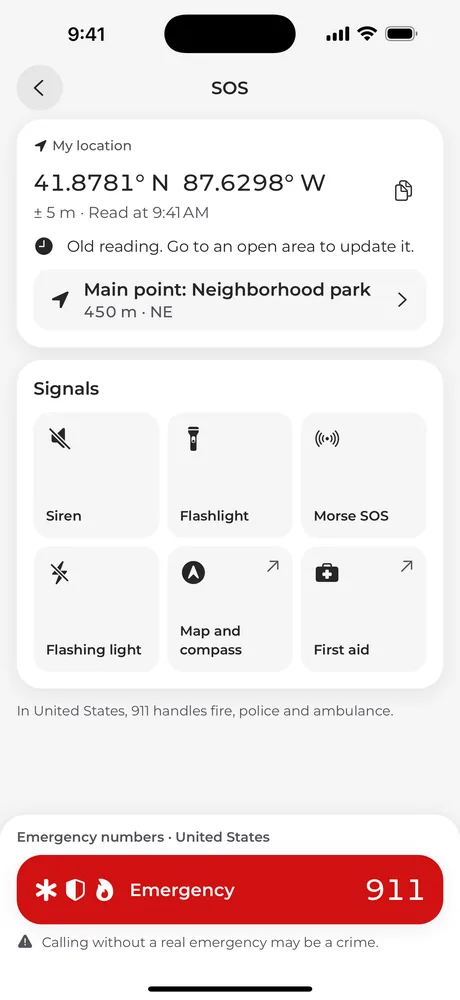
SOS

Call and give your location

Police, fire or emergency services in one tap, with your country’s numbers. Your location on screen so you can read it to the dispatcher.

  • Flashlight, Morse SOS, flashing light and a siren so people can see and hear you.
  • A maximum-contrast Tactical mode, designed for nighttime.
  • Calling needs phone signal; everything else works offline.
SOS: call and give your location

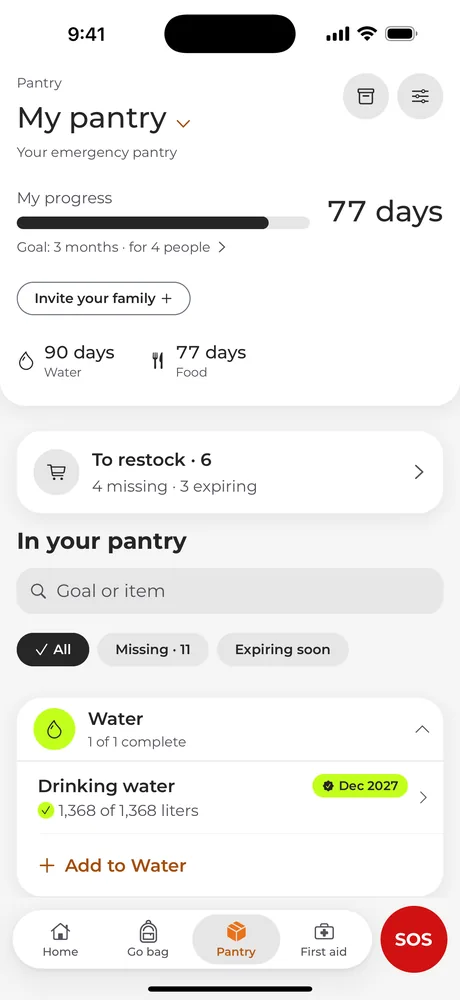
Pantry

Pantry: your emergency food supply.

Pantry is your emergency food supply for longer crises: shelf-stable food, water, batteries, candles and hygiene items, each with its expiry date.

For 14 to 365 days, based on the people in your home.

Your supply lasts90 days

Pantry, the app’s emergency food supply, sized per person

The essentials

What your family needs for the first three days, worked out per person and always at hand, offline.

A clear plan for every group

Families, schools, companies or communities: each group sets up its plan, its meeting point and its base list.

  • Families

    One go bag for the whole household

    Add the people in your home and the app adjusts the targets for water, food and medicine. Everyone knows where to meet.

    • Targets per person
    • Meeting points
    • Expiry alerts
  • Schools

    Teach students how to prepare

    Short, clear guides to practice what to do in an earthquake or a fire, in each student’s language.

    • Before, during and after
    • 7 languages
    • Short, clear steps
  • Businesses

    Support for your emergency plan

    Help everyone on your team keep their go bag up to date and know where the office meeting point is.

    • Office meeting point
    • First aid at hand
    • Works without the company network
  • Communities

    Neighbors getting ready together

    Neighborhood associations, apartment buildings and local groups: one meeting point and the same starter checklist for everyone.

    • Shareable starter checklist
    • Compass to the meeting point
    • Designed with older adults in mind

Everything you need, in one place

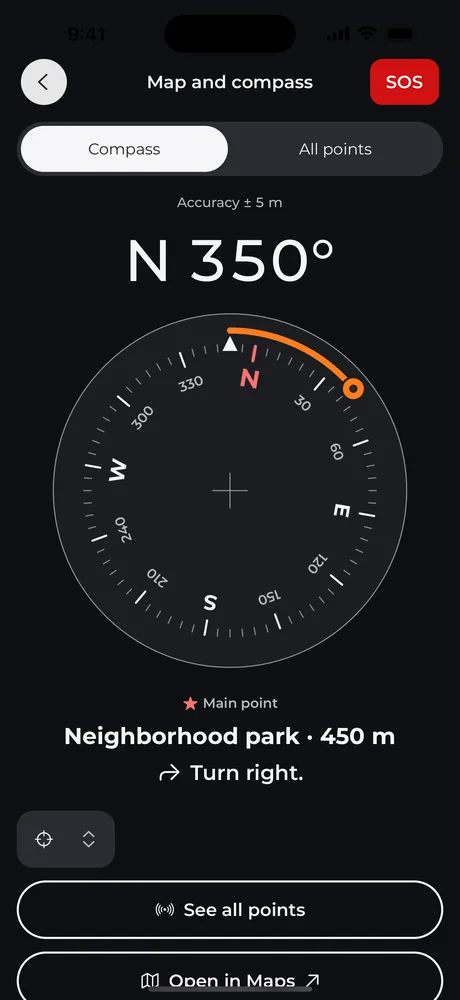
Meeting pointsReach your meeting point with no signal

Save where your family will meet. The compass shows the distance and direction to each point, without maps or data.

  • Several points: home, school, the neighborhood park.
  • Uses your phone’s GPS, no internet needed.
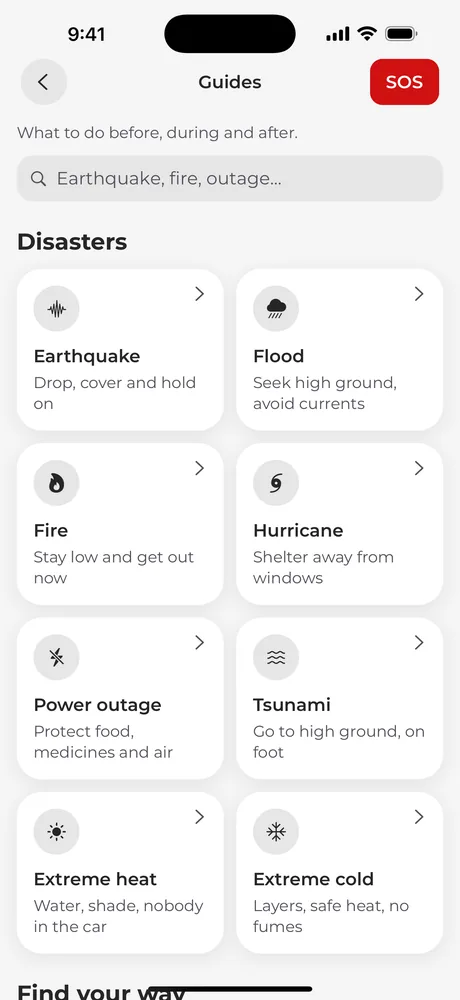
Guides and first aidWhat to do before, during and after

Earthquake, hurricane, flood, fire, tsunami, power outage, extreme heat and extreme cold, in short steps with their sources shown.

  • Step-by-step first aid, and when to call emergency services.
  • Hands-only CPR, with a metronome that keeps the pace.
Reach your meeting point with no signal
What to do before, during and after

Guides

For every situation

Eight disaster guides inside the app, in short steps, with their sources.

  1. 01

    Earthquake

    Drop, cover and hold on

    Before · during · after · offline

  2. 02

    Flood

    Seek high ground, avoid currents

    Before · during · after · offline

  3. 03

    Fire

    Stay low and get out now

    Before · during · after · offline

  4. 04

    Hurricane

    Shelter away from windows

    Before · during · after · offline

  5. 05

    Power outage

    Protect food, medicines and air

    Before · during · after · offline

  6. 06

    Tsunami

    Go to high ground, on foot

    Before · during · after · offline

  7. 07

    Extreme heat

    Water, shade, nobody in the car

    Before · during · after · offline

  8. 08

    Extreme cold

    Layers, safe heat, no fumes

    Before · during · after · offline

Clear information, with its sources

The guides and first aid steps are based on well-known public sources. Each guide shows where its information comes from.

Guide sources

  • CDC (Centers for Disease Control and Prevention)
  • FEMA and Ready.gov
  • NWS / NOAA (U.S. National Weather Service)
  • American Red Cross and British Red Cross
  • World Health Organization (WHO)
  • MedlinePlus

Your data, on your phone

Everything works offline and is stored on your phone. When you’re online, it’s backed up to your Apple or Google account so you don’t lose anything when you change phones. Your live location and your PIN never leave your phone.

Frequently asked questions

Email us at rescutekit@artstudiogroup.com or visit the support page.

Is it free?

Yes. Everything you see here is free, including the backup to your account. RescuteKit Pro, optional, adds sharing with your family, more go bags and more pantries.

Does it work without internet?

Yes. The guides, first aid, go bag, pantry, compass and SOS signals all live inside the app. Only the emergency call needs phone signal.

Do I need to create an account?

Yes, once. You create it inside the app with Apple or Google; there's no sign-up on the web. That first sign-in needs internet. After that you stay signed in, and the app opens and works offline. You can delete your account from the app at any time.

What data does it store?

Your go bag, pantry, meeting points and household details are stored on your phone and, when you're online, backed up to your account so you don't lose them and can use them on your other phones. With Pro you can share them with your family. Your live location and your PIN never leave your phone. For your account we keep your name, your email (or the relay address, if you use Apple's Hide My Email), an ID and, if you sign in with Google, the link to your profile photo, which your family can see. For the weather, the app sends an approximate location with no personal details to our server, which asks Apple Weather. It also sends crash reports and, only if you agree, usage data to improve the app. There are no ads. The privacy policy has the details.

Which countries does it work in?

Any country. SOS uses your country’s emergency numbers and, if your country isn’t listed, 112. The guides and the go bag are useful anywhere.

What is RescuteKit Pro?

It will be an optional subscription to share your go bag and pantry with your family, kept in sync on everyone’s phones, with multiple go bags and pantries. Everything else, including the backup to your account, will stay free.

Does it replace emergency services?

No. RescuteKit helps you prepare and keep information at hand. In an emergency, always call your local emergency number.

Get ready today, calmly.

Download RescuteKit and pack your go bag in an afternoon. It works without internet from day one.

The app isn’t published yet. These buttons will go live on launch day.